> ## Documentation Index
> Fetch the complete documentation index at: https://phidatainc-agui.mintlify.site/llms.txt
> Use this file to discover all available pages before exploring further.
# MLflow
> Integrate Agno with MLflow to automatically capture OpenTelemetry-native traces from your agents with a single line of code.
## Integrating Agno with MLflow
[MLflow](https://mlflow.org/) provides built-in GenAI tracing so you can capture, explore, and analyze LLM and agent traces. Agno integrates directly with MLflow via a single call to `mlflow.agno.autolog()`.
## Prerequisites
1. **Install Dependencies**
Ensure the required packages are installed:
```bash theme={null}
pip install -U mlflow agno opentelemetry-exporter-otlp openinference-instrumentation-agno
```
2. **Start the MLflow tracking server**
Start the MLflow tracking server to view traces as you run your code:
```bash theme={null}
mlflow server
```
For more information on how to host an MLflow server, see the [MLflow documentation](https://mlflow.org/docs/latest/self-hosting/).
If you don't want to self-host an MLflow server, you can use [Managed MLflow](https://mlflow.org/docs/latest/self-hosting/#cloud-services) offered by various cloud providers.
## Set Environment Variables
Set the environment variables for the MLflow server URL and experiment name:
```bash theme={null}
export MLFLOW_TRACKING_URI="http://localhost:5000"
export MLFLOW_EXPERIMENT_NAME="Agno Agent"
```
Alternatively, you can set these in your code using Python APIs. If you do this, you must call this before calling `mlflow.agno.autolog()`.
```python theme={null}
import mlflow
mlflow.set_tracking_uri("http://localhost:5000")
mlflow.set_experiment("Agno Agent")
```
## Enable Automatic Tracing in Your Code
Call `mlflow.agno.autolog()` once at startup, then use your Agno agent as usual. MLflow will automatically record traces of model/tool calls and agent steps.
```python theme={null}
import mlflow
from agno.agent import Agent
from agno.models.openai import OpenAIChat
from agno.tools.yfinance import YFinanceTools
# Enable MLflow tracing for Agno
mlflow.agno.autolog()
# Create and use the agent
agent = Agent(
model=OpenAIChat(id="gpt-5-mini"),
tools=[YFinanceTools()],
instructions="Use tables to display data. Don't include any other text.",
markdown=True,
)
agent.print_response("What is the stock price of Apple?", stream=False)
```
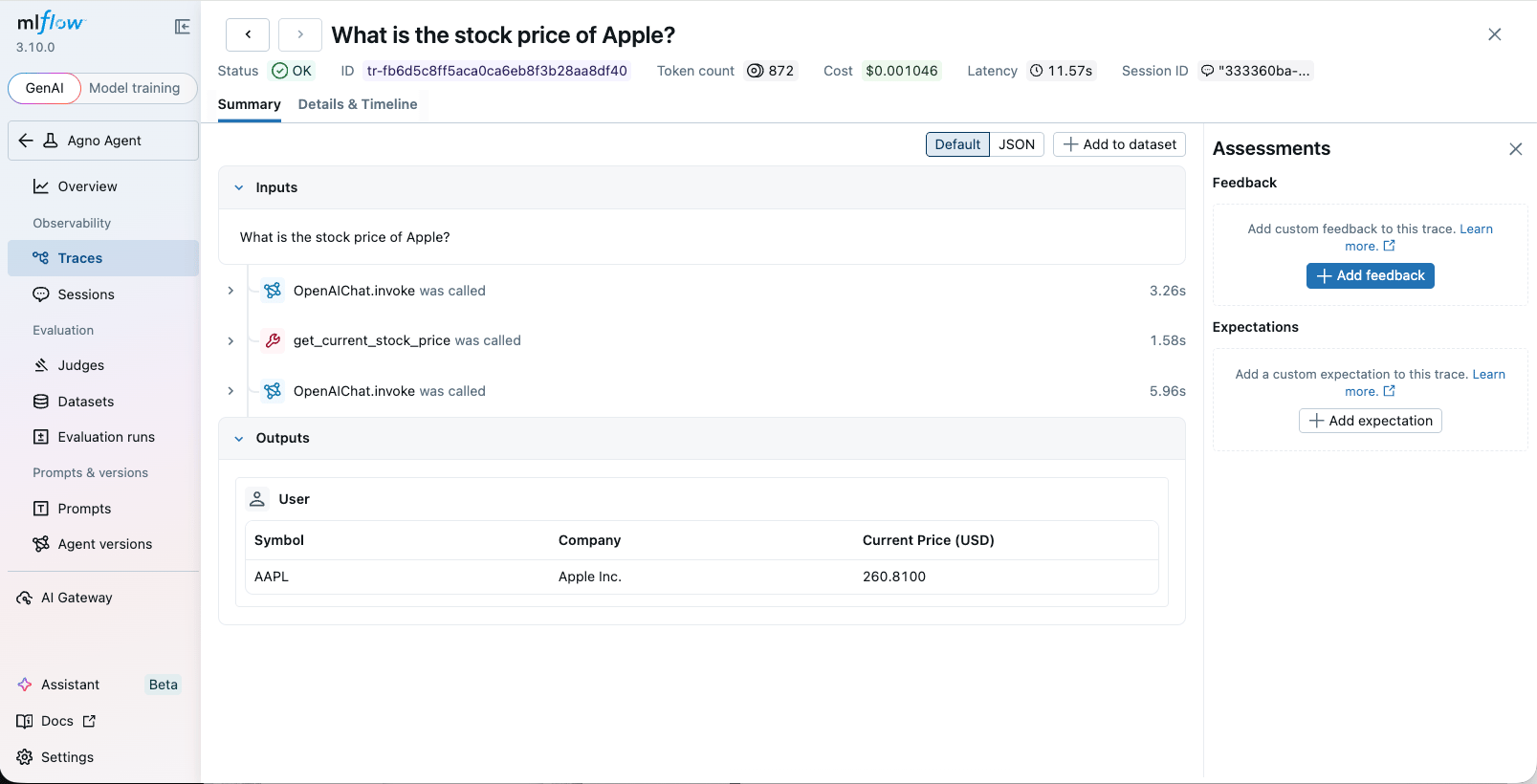
## View Traces
Access the MLflow UI to view the traces. If you started the UI locally, open `http://127.0.0.1:5000` in your browser. If you are using a managed MLflow server, you can access the UI at the URL provided by the cloud provider.
 ## AgentOS example
You can instrument your AgentOS application with MLflow by using the same approach as above. Simply call `mlflow.agno.autolog()` before creating your AgentOS instance.
```python agno_assist.py theme={null}
import mlflow
from agno.agent import Agent
from agno.db.sqlite import SqliteDb
from agno.models.anthropic import Claude
from agno.os import AgentOS
from agno.tools.mcp import MCPTools
# Setup automatic tracing for Agno
mlflow.agno.autolog()
agno_assist = Agent(
name="Agno Assist",
model=Claude(id="claude-sonnet-4-5"),
db=SqliteDb(db_file="agno.db"), # session storage
tools=[MCPTools(url="https://docs.agno.com/mcp")], # Agno docs via MCP
add_datetime_to_context=True,
add_history_to_context=True, # include past runs
num_history_runs=3, # last 3 conversations
markdown=True,
)
# Serve via AgentOS → streaming, auth, session isolation, API endpoints
agent_os = AgentOS(agents=[agno_assist], tracing=True)
app = agent_os.get_app()
```
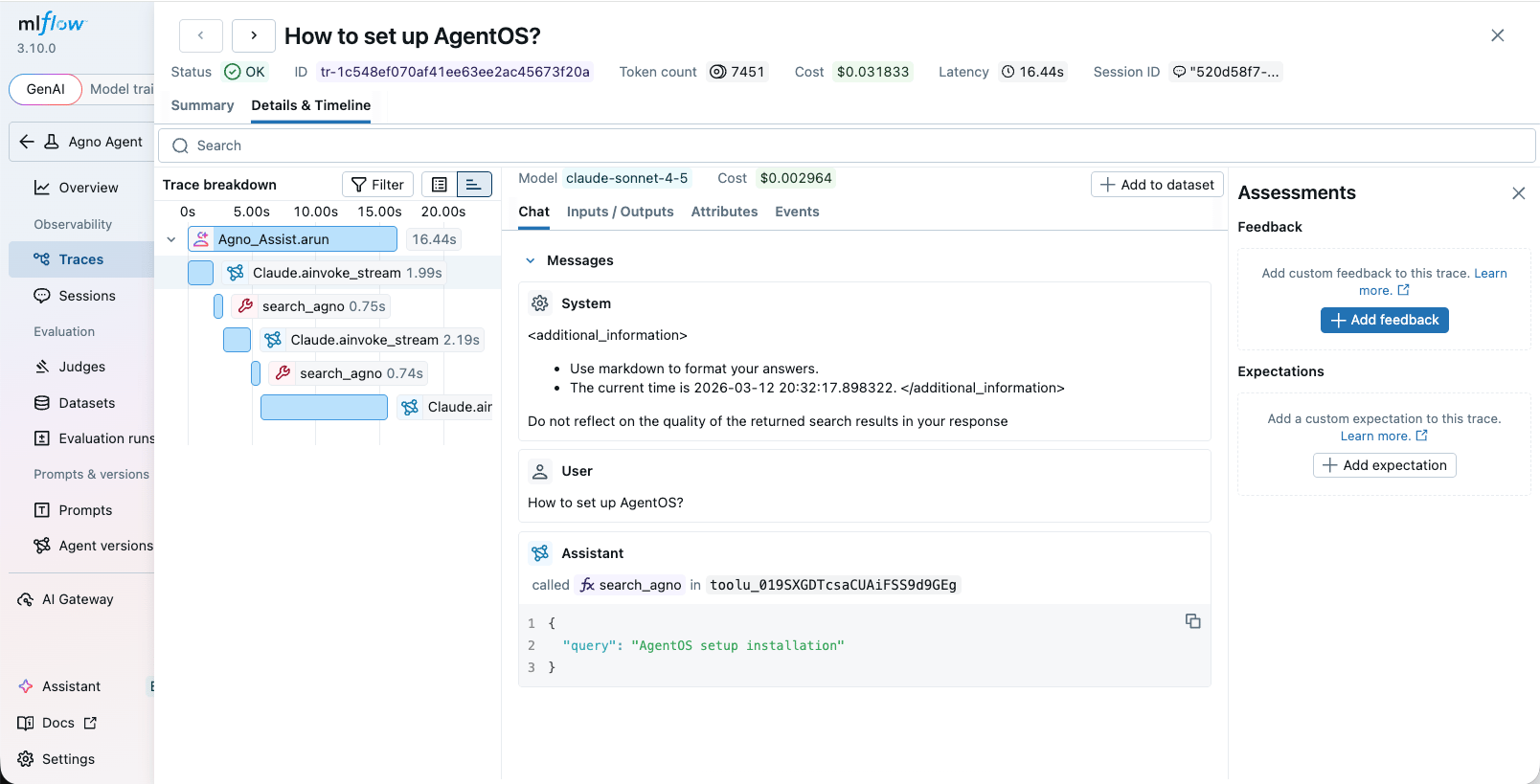
Then run your AgentOS application following the [instructions](/agent-os/run-your-os). MLflow will automatically record traces of model/tool calls and agent steps.
## AgentOS example
You can instrument your AgentOS application with MLflow by using the same approach as above. Simply call `mlflow.agno.autolog()` before creating your AgentOS instance.
```python agno_assist.py theme={null}
import mlflow
from agno.agent import Agent
from agno.db.sqlite import SqliteDb
from agno.models.anthropic import Claude
from agno.os import AgentOS
from agno.tools.mcp import MCPTools
# Setup automatic tracing for Agno
mlflow.agno.autolog()
agno_assist = Agent(
name="Agno Assist",
model=Claude(id="claude-sonnet-4-5"),
db=SqliteDb(db_file="agno.db"), # session storage
tools=[MCPTools(url="https://docs.agno.com/mcp")], # Agno docs via MCP
add_datetime_to_context=True,
add_history_to_context=True, # include past runs
num_history_runs=3, # last 3 conversations
markdown=True,
)
# Serve via AgentOS → streaming, auth, session isolation, API endpoints
agent_os = AgentOS(agents=[agno_assist], tracing=True)
app = agent_os.get_app()
```
Then run your AgentOS application following the [instructions](/agent-os/run-your-os). MLflow will automatically record traces of model/tool calls and agent steps.
 ## Notes
* Ensure your model provider credentials (for example, `OPENAI_API_KEY`) are set in the environment.
* For best results, use the latest MLflow version that includes the Agno autolog integration.
## Notes
* Ensure your model provider credentials (for example, `OPENAI_API_KEY`) are set in the environment.
* For best results, use the latest MLflow version that includes the Agno autolog integration.