> ## Documentation Index
> Fetch the complete documentation index at: https://phidatainc-agui.mintlify.site/llms.txt
> Use this file to discover all available pages before exploring further.
# Authorization
> JWT validation and scope-based permissions for AgentOS endpoints.
AgentOS validates the JWT on every request, then checks its scopes against the permissions each endpoint requires. This controls who can access and run your agents, teams, and workflows.
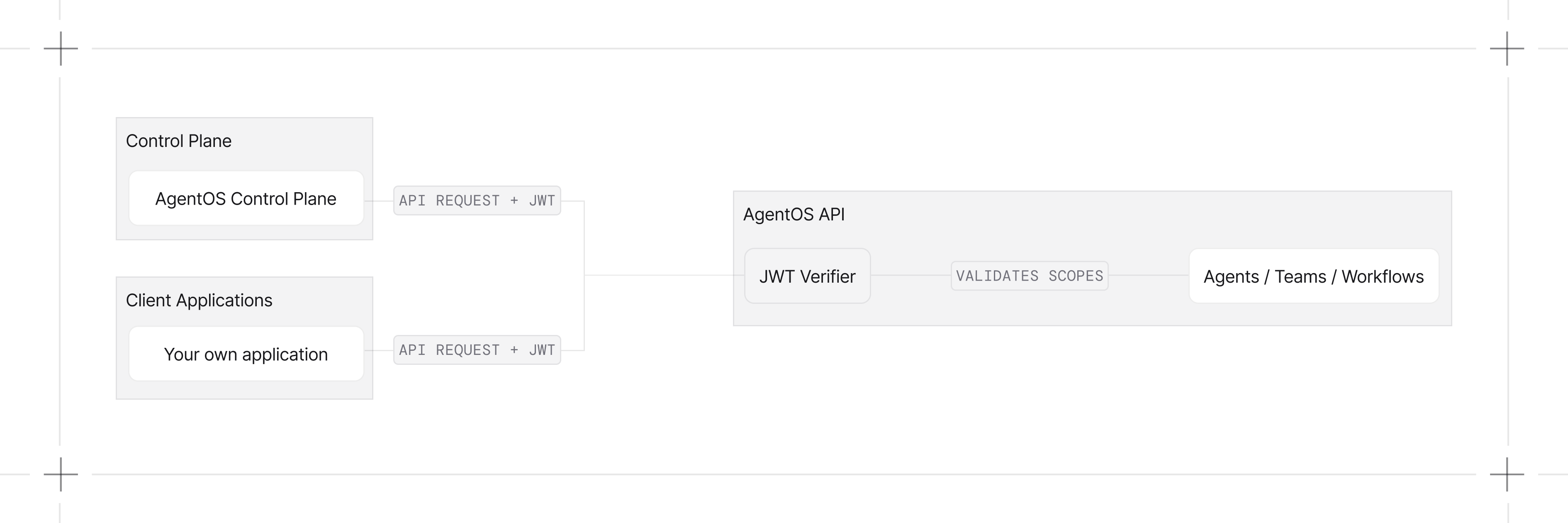
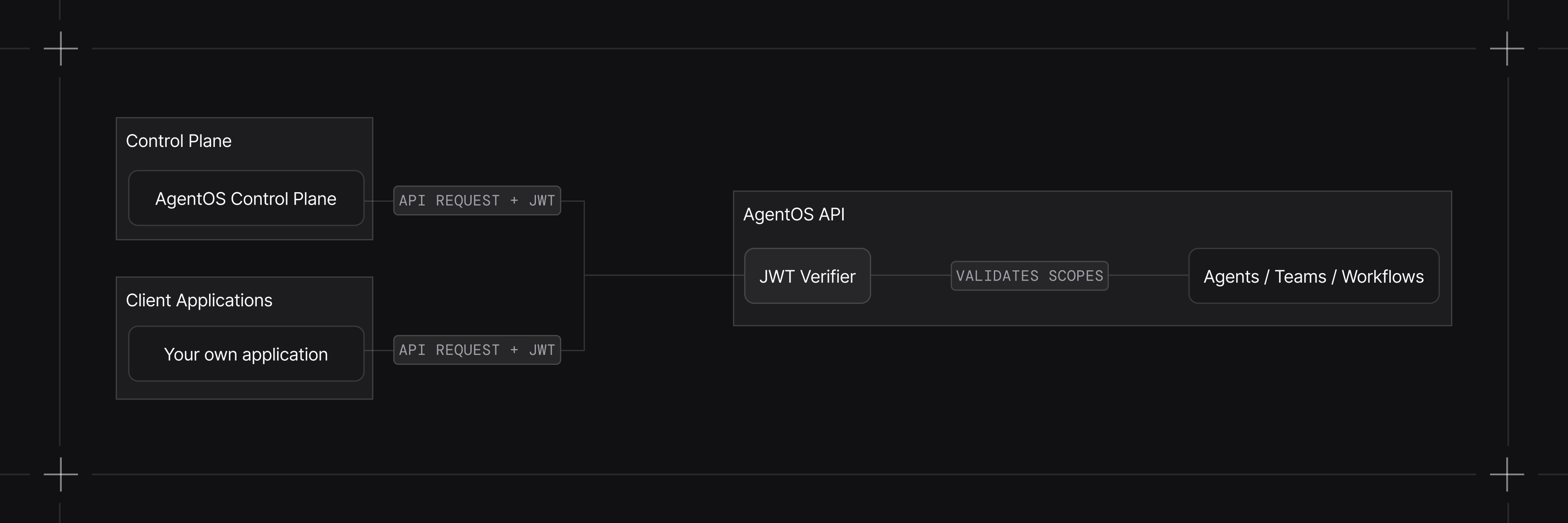 Enable authorization when initializing AgentOS:
```python theme={null}
from agno.agent import Agent
from agno.models.openai import OpenAIResponses
from agno.os import AgentOS
agent = Agent(
id="my-agent",
model=OpenAIResponses(id="gpt-5.2"),
)
agent_os = AgentOS(
id="my-agent-os",
agents=[agent],
authorization=True,
)
app = agent_os.get_app()
```
## Key Concepts
| Concept | Description |
| --------- | --------------------------------------------------------------------------------------------- |
| Tokens | JWTs signed by the control plane or your own backend, sent as `Authorization: Bearer ` |
| Scopes | Permission strings in the `scopes` claim, like `agents:read` or `agents:my-agent:run` |
| Roles | Named bundles of scopes assigned to users (Owner, Administrator, Member, or custom) |
| Isolation | Per-user data scoping for sessions, memories, and traces |
## Learn How To
Enable authorization, set a verification key, and make your first authenticated request.
JWT claim structure, example tokens, and how AgentOS reads them.
Run AgentOS without the control plane by issuing and verifying your own JWTs.
Scope format and the full permission reference for every AgentOS endpoint.
Default roles and custom roles defined in the control plane.
Scope sessions, memories, and traces to the caller's user ID.
## Examples
Enable authorization with a shared-secret JWT (HS256).
Sign with a private key, verify with the public key (RS256).
Grant specific permissions to specific agents.
Scope sessions, memory, and traces per user with `user_isolation=True`.
## Developer Resources
Configure token sources, claim extraction, and scope checking.
Configuration options for JWT verification.
Complete JWT middleware class reference.
Enable authorization when initializing AgentOS:
```python theme={null}
from agno.agent import Agent
from agno.models.openai import OpenAIResponses
from agno.os import AgentOS
agent = Agent(
id="my-agent",
model=OpenAIResponses(id="gpt-5.2"),
)
agent_os = AgentOS(
id="my-agent-os",
agents=[agent],
authorization=True,
)
app = agent_os.get_app()
```
## Key Concepts
| Concept | Description |
| --------- | --------------------------------------------------------------------------------------------- |
| Tokens | JWTs signed by the control plane or your own backend, sent as `Authorization: Bearer ` |
| Scopes | Permission strings in the `scopes` claim, like `agents:read` or `agents:my-agent:run` |
| Roles | Named bundles of scopes assigned to users (Owner, Administrator, Member, or custom) |
| Isolation | Per-user data scoping for sessions, memories, and traces |
## Learn How To
Enable authorization, set a verification key, and make your first authenticated request.
JWT claim structure, example tokens, and how AgentOS reads them.
Run AgentOS without the control plane by issuing and verifying your own JWTs.
Scope format and the full permission reference for every AgentOS endpoint.
Default roles and custom roles defined in the control plane.
Scope sessions, memories, and traces to the caller's user ID.
## Examples
Enable authorization with a shared-secret JWT (HS256).
Sign with a private key, verify with the public key (RS256).
Grant specific permissions to specific agents.
Scope sessions, memory, and traces per user with `user_isolation=True`.
## Developer Resources
Configure token sources, claim extraction, and scope checking.
Configuration options for JWT verification.
Complete JWT middleware class reference.